
MBM For Elevators – Documentation
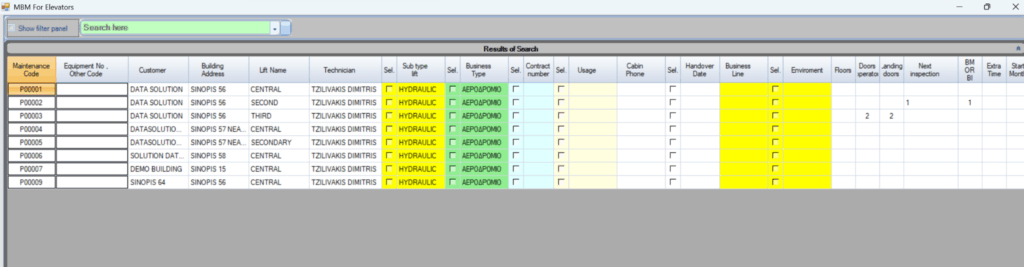
The MBM For Elevators form displays detailed information about the maintenance and technical characteristics of all lifts in the system.
By default, it lists all registered lifts with their associated details. You can use the filter panel at the top-left to search and filter through the data.
Information Shown
Each row represents a lift and includes:
- Maintenance Code & Equipment Number
- Customer & Building Address
- Lift Name
- Technician
- Lift Subtype (e.g., Hydraulic)
- Business Type
- Contract Number & Usage
- Cabin Phone & Handover Date
- Business Line & Environment
- Floors, Doors, Landing Doors
- Next Inspection Date
- Other related attributes (BM/BI, Extra Time, Start Month)
Editing Data
You can edit the data in two ways:
1️⃣ Manual Editing
- Simply double-click on a cell to type in and change its value.
2️⃣ Bulk Editing
- Some columns have checkboxes, which indicate fields that can be updated in bulk.
- To perform a bulk update:
- For each unit you want to modify, check the checkbox in the correct column.
- Once you’ve selected the appropriate checkboxes, right-click the checkbox at the top of the column and select the desired action.
Important Notes
⚠️ Each editable field has its own checkbox in its column — one per unit.
⚠️ You must explicitly check the box in the correct column and row for each unit you want to edit.
⚠️ You can mix manual edits (by double-clicking) with bulk edits as needed.
If you’d like, I can also create a polished manual or quick-reference card with screenshots and arrows to make it even easier to follow. Just say the word!